


If you work in IT, you’ve probably heard of Rack PCs.
They’re very well-known.
However, you might never have heard of Industrial Racks.
Yes—they exist too.
Many people assume that buying a Rack PC for a specific application is enough.
After all, we’re talking about well-known brands that have been on the market for years, offering PCs at sometimes very high prices. It’s perfectly natural to think that the PC you’re choosing is reliable and will ensure continuity.
And indeed, it usually is.
But using these systems in non-standard conditions can turn a purchase into a costly mistake.
With this guide, we want to help you understand the real differences between an Industrial Rack PC and a classic Rack PC, which we call a Business Rack.
Business Rack PCs: What They Are and Where They Are Used
Have you ever seen a server room?
That climate-controlled room with rows of cabinets full of PCs, UPS units, LAN cables, switches, and so on?
Well, that’s where Business Rack PCs are usually installed.
But what exactly are they?
By this term, we mean Rack-format PCs, typically pre-built and often supplied by well-known major brands. These are PCs designed for simple, climate-controlled environments—basically, nothing too demanding.
Business Racks usually operate at temperatures ranging from 0 to 40–60°C.
This is their ideal temperature range.
So, the typical applications for these computers are the classic ones: video surveillance, data centers, cloud computing, and similar setups.
But what really sets Business PCs apart from Industrial Rack PCs?
The 4 Key Differences Between an Industrial Rack PC and a Business Rack PC
They may look the same from the outside—but they aren’t.
In fact, Industrial Racks and Business Racks differ in four main characteristics.
1) Durability
Suppose you’re tasked with a project that requires the constant use of multiple Rack PCs, which need to last for many years.
The project includes software development, disk images, and product certifications.
Do you have this picture in mind?
Good.
Now, forget about using a standard Business Rack.
Business Rack PCs have relatively short production lifespans. The most professional ones might last up to three years.
Now imagine, in 2–3 years, having to revisit your project because the hardware for your PCs is no longer available.
What costs would you face, even just for revising the software code and recertifying the product?
This is why people with such long-term needs usually choose Industrial Rack PCs.
That way, 10–15 years down the line, if they need to order another batch of the same exact Rack PCs, they can do so without risking that the models are discontinued.
Exactly—Industrial Rack PCs have a much longer production lifespan. They can last up to 10–15 years.
Note: if this applies to your situation, it’s very important to discuss it with the technician designing your system.
This way, you’ll be provided with the right hardware for your project.
2) Resistance and Robustness
This is another very important factor, one that takes into account the environment in which the Rack PCs will be placed.
It’s not just climate-controlled server rooms—there are also cabinets on the factory floor, racks along roads or in tunnels for traffic analysis, and outdoor cabinets for video surveillance…
In these contexts, the environmental factor becomes critical.
Industrial hardware is designed to withstand harsher environmental conditions, such as wide temperature ranges (-40°C to +70°C), high humidity levels, vibrations, and more.
A standard Business Rack in such conditions would have a short lifespan. An Industrial Rack, on the other hand, can be deployed in these environments and reliably guarantee the operational performance you expect.
Again, it’s crucial to inform the technician handling your project about the environmental conditions where your Rack will operate. This ensures you receive the appropriate hardware for your needs.
3) Applications and Use Cases
As you might have understood, an Industrial Rack PC can easily be used in place of a Business Rack PC, since it has superior features.
However, a Business Rack PC cannot always replace an Industrial Rack.
Environmental factors play a major role in choosing your Rack, because the environment in which the PC will operate is one of the most crucial aspects to consider.
But sometimes environmental factors alone aren’t enough, and further considerations are necessary.
Here’s a practical example: video surveillance.
In this field, operating temperatures are usually standard.
Server rooms are controlled, so for non-specialists, a simple Business Rack might be sufficient.
Now imagine video surveillance on buses, trains, or ships.
We would need small and compact Racks (because space is limited) that are either powerful or resistant to vibrations.
Or, in other cases, we might need Racks that have certifications for railway or maritime use.
So even if temperatures are controlled and the environment seems normal, there are requirements that only an Industrial Rack PC can meet.
Don’t believe that small, compact Racks exist?
Video surveillance is just one example. But try to imagine a Rack in an operating room in the medical sector, or a Rack in the military field.
In these contexts, using a Business Rack could be detrimental.
Some of our clients use highly specialized Industrial Racks in broadcasting and production environments. Imagine a service company managing a concert.
You need power, reliability, and portability.
Here, compactness becomes essential.
Remember: it’s always important to ask yourself…
“What do I need to do with this Rack, and where will I use it?“
First, answer that question. Then, communicate your answers to the technician, and you’ll see that they’ll be able to recommend the best PC for your application.
4) Rack PC Customization
And here we touch on a very delicate topic.
Business Racks are rarely customizable.
Each brand offers its own catalog of pre-built, pre-assembled computers.
When we talk about customizable Industrial PCs, we mean computers that can be tailored to your needs, much like a tailor crafting the perfect suit for the event you’re about to attend.
Having a partner who isn’t tied to a single brand but can select products specifically suited to your application becomes key in this situation.
This way, you get a PC that meets all your specifications, without having to adapt to a pre-packaged computer with features you don’t need.
Plus, it allows you to optimize costs.
As you can see, choosing the right partner to work with is extremely important.
Is it a partner with industry experience?
Can they provide product certifications?
Do they have system certifications and a proven track record?
If the answer is yes… then you’ve definitely found the right partner for your projects!
So, ultimately, which PC should you choose: an Industrial Rack or a Business Rack?
The answer is: it depends.
Depends on what? On the four points outlined above.
FAQ: The Most Common Questions and Concerns About Rack PCs
If you’ve made it this far, you now have all the information you need to make an informed choice between a Business Rack and an Industrial Rack.
Or almost.
We decided to go a step further.
To help you even more in choosing your Rack, we’ve compiled the most common questions and concerns our clients have asked over more than 10 years of experience.
Rack PCs are expensive.
Certainly, a rack PC, needing to withstand harsher environments and ensuring longer production lifespan, has a slightly higher cost compared to standard business rack systems.
First of all, though, you need to consider the supply channel.
If a rack manufacturer can customize a PC exactly to your specifications, it means that by eliminating functions and features you don’t need, you could even purchase it at a much lower price than standard business racks.
Moreover, think about this…
How much would it cost you to recertify, revise your software, or manage RMAs due to buying the wrong rack, just because it was cheaper?
Often, people focus only on the initial price without considering the financial (and time) costs down the line.
Think about it carefully.
2) I PC Rack sono ingombranti
Many people think that rack PCs are very large and cumbersome.
However, industrial racks are not all the same and are not necessarily large.
The standard size is 4U (units), but you can also find 1U racks and even very compact ones. Typical examples are racks that can be transported by media servers in fly cases.
Or those small “mini-racks” in wall-mounted cabinets in production areas.
In fact, by using the “low-power” technology of certain processor variants, you can achieve high performance in a very small space.
3) Rack PCs are too noisy
True.
Imagine: CPU fan, power supply fan, graphics card fans, cooling fans.
The PC makes noise. And if the PC needs to be installed in a quiet environment (office, showroom, etc.), that noise can be bothersome.
However, with the right measures, we can reduce the noise to almost zero.
Don’t believe it?
Check out our Kimera 1U racks, completely silent, which have been installed by Aten in their showrooms.
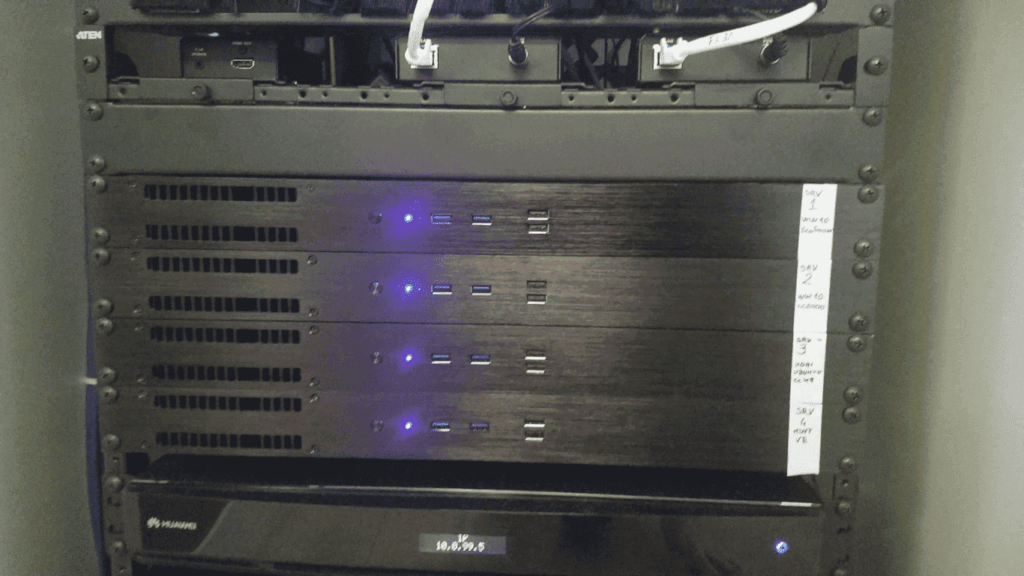
It’s been 8 years, and these PCs are still fully operational, running 24/7 in showrooms, completely silently.
4) What temperatures can racks reach?
The answer is quite simple.
Usually, a “standard” rack PC is built with components rated for 0°C to +40°C.
In the industrial world, you can use components designed to operate at extended temperatures, from -20°C to +70°C.
Of course, these are not components you’ll easily find on the market. Designing a PC to work under these conditions requires technical knowledge and experience.
It’s not just temperature you need to consider, but also humidity. Poor design could compromise the PC’s functionality after only a few months.
If operating in temperatures outside the -20°C to +70°C range, external measures are usually needed to ensure the PC and connected devices function properly (air conditioning, heating, etc.).
Which industrial rack PC should you choose?
Industrial rack PCs are classified according to their rack units (U), which indicate the height of the system within a standard 19-inch cabinet:
- 1U: Extremely compact, ideal when space is limited but you don’t want to compromise on high performance.
- 1.5U – 2U: Slightly taller, offering greater flexibility for additional components or advanced cooling systems.
- 4U and above: Traditionally large, suitable for very complex configurations or systems with special expansion requirements.
Additionally, the modularity of a rack allows you to adapt both components and internal structure to your needs, creating a system that is fully customizable and scalable over time.
Beyond height, rack PCs can vary in features—fanless or with fans, performance levels, resistance to industrial environments—and offer a wide range of options for customizing internal components.
In reality, there is no “perfect rack” for everyone. The right choice depends on your specific application and the industry in which it will be used.
You could rely on classic rack brands, pick a configuration from their website (good luck with that!), or…
…you could work with experienced manufacturers who carefully analyze all environmental, technological, and application factors of your project, delivering the perfect, fully functional machine for you.
If you need an industrial rack PC that fits your application and sector perfectly, and aren’t sure which model is best, put us to the test!
We’ll guide you in selecting the industrial PC that’s ideally suited for your needs.
